Meta event deduplication: why Pixel and Conversions API count twice, and how to fix it
Pixel and Conversions API report every conversion twice. How Meta merges the two, how to spot double counting, and the most common causes.
 Daniel Kalcher7 min read
On this page
- How Meta merges browser and server events
- How to spot double counting
- How to check in Events Manager
- The 6 most common causes of double counting
- 1. Browser and server each create their own ID
- 2. The ID is missing on one path or in the wrong place
- 3. Event names differ
- 4. Several setups send in parallel
- 5. The browser fires more than once
- 6. One ID for everything
- What deduplication doesn't do
- How TSO does it: deduplication without your own code
- Conclusion
If you run the Meta Pixel and the Conversions API together, every conversion reaches Meta twice: once from the browser, once from the server. That is intended, because the server path catches what ad blockers and browser tracking protection swallow. Whether Meta turns that into one lead or two is up to deduplication.
When it fails, the ad account looks better than it is: twice the leads, half the CPL, and the algorithm allocates budget based on numbers that are wrong. This article explains how Meta merges the two reports, how to spot double counting and where it usually comes from.
How Meta merges browser and server events
Meta compares two fields: the event name and the event ID. If both match, Meta keeps one report and discards the other. The fields have different names in the pixel and in the Conversions API:
| Meta Pixel (browser) | Conversions API (server) | |
|---|---|---|
| Event name | first parameter of fbq('track', …) | event_name |
| Event ID | eventID option in the fourth argument | event_id |
In the browser, a lead looks like this:
fbq('track', 'Lead', { value: 50, currency: 'EUR' }, { eventID: 'lead-7f3a9c2e' })
And on the server, for the same event:
{
  "data": [
    {
      "event_name": "Lead",
      "event_id": "lead-7f3a9c2e",
      "event_time": 1795779780,
      "action_source": "website",
      "user_data": { "em": ["<SHA-256 of the email>"] }
    }
  ]
}
According to Meta's developer docs on handling duplicate Pixel and Conversions API events:
- 48 hours: reports with the same name and ID are merged if they arrive within 48 hours.
- Browser first: if both arrive at about the same time, Meta prefers the browser report.
- Event ID is the way to go: Meta also describes merging via
fbporexternal_id. It only works in certain setups and is more error-prone. Use the event ID.
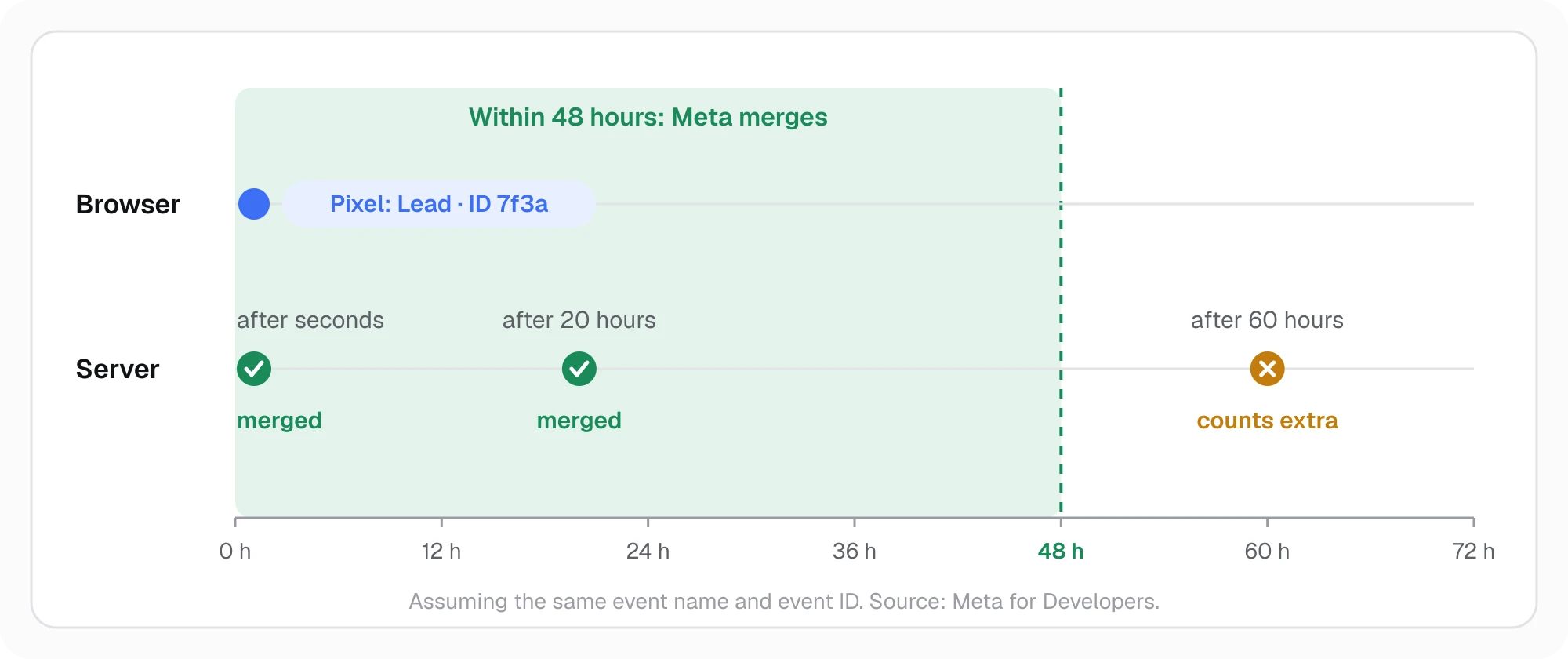
The ID itself can be any string. Two properties matter: it is unique per event (every lead has its own) and identical on both paths. For purchases the order number works well, for leads a random ID created when the form is submitted.
How to spot double counting
Duplicate conversions rarely stand out on their own, because the numbers look good at first. Be suspicious if:
- Meta reports clearly more leads than your CRM or inbox, consistently and not just on a few days.
- your CPL suddenly drops after setting up the Conversions API, while nothing changed in campaigns or on the website.
- the "Results" column shows more leads than your analytics shows form submissions.
How to check in Events Manager
- Open Events Manager and select your dataset (the pixel).
- In the overview, click the event in question, such as
Lead, and compare the browser and server numbers. - Check the deduplication section: there Meta shows how many browser and server events carry an event ID. If either value is well below 100%, that path is missing the ID.
- Look under Diagnostics for issues about missing event IDs or server events that are not deduplicated.
- Send a test lead in the Test events tab and check that the browser and server reports arrive with the same ID and that Meta shows them as deduplicated.
The 6 most common causes of double counting
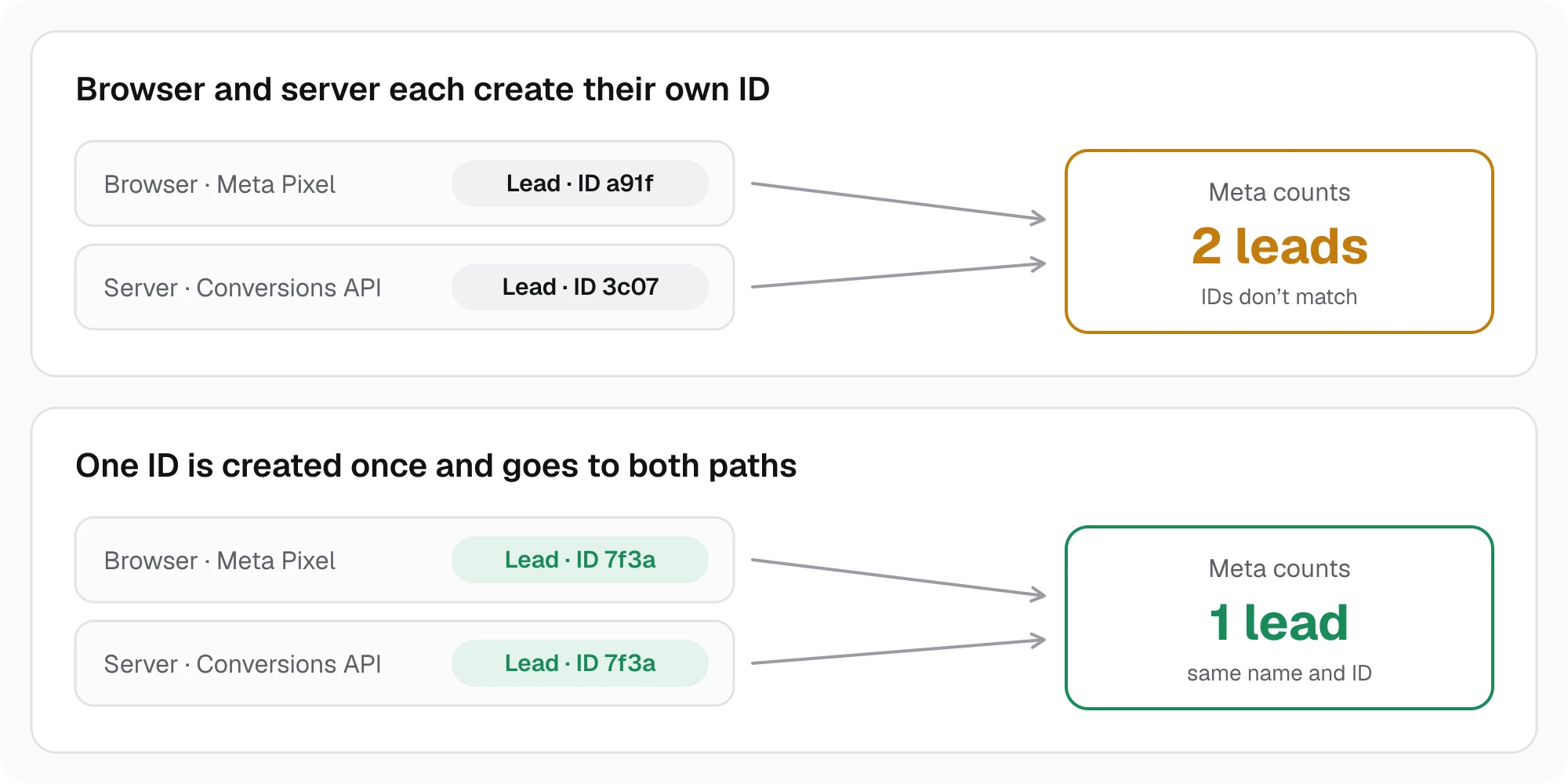
1. Browser and server each create their own ID
The classic: the pixel generates a random ID on submit, the server generates a second one while processing. Both reports have an ID, just never the same one. The ID has to be created in one place, usually the browser, and passed to the server with the form.
2. The ID is missing on one path or in the wrong place
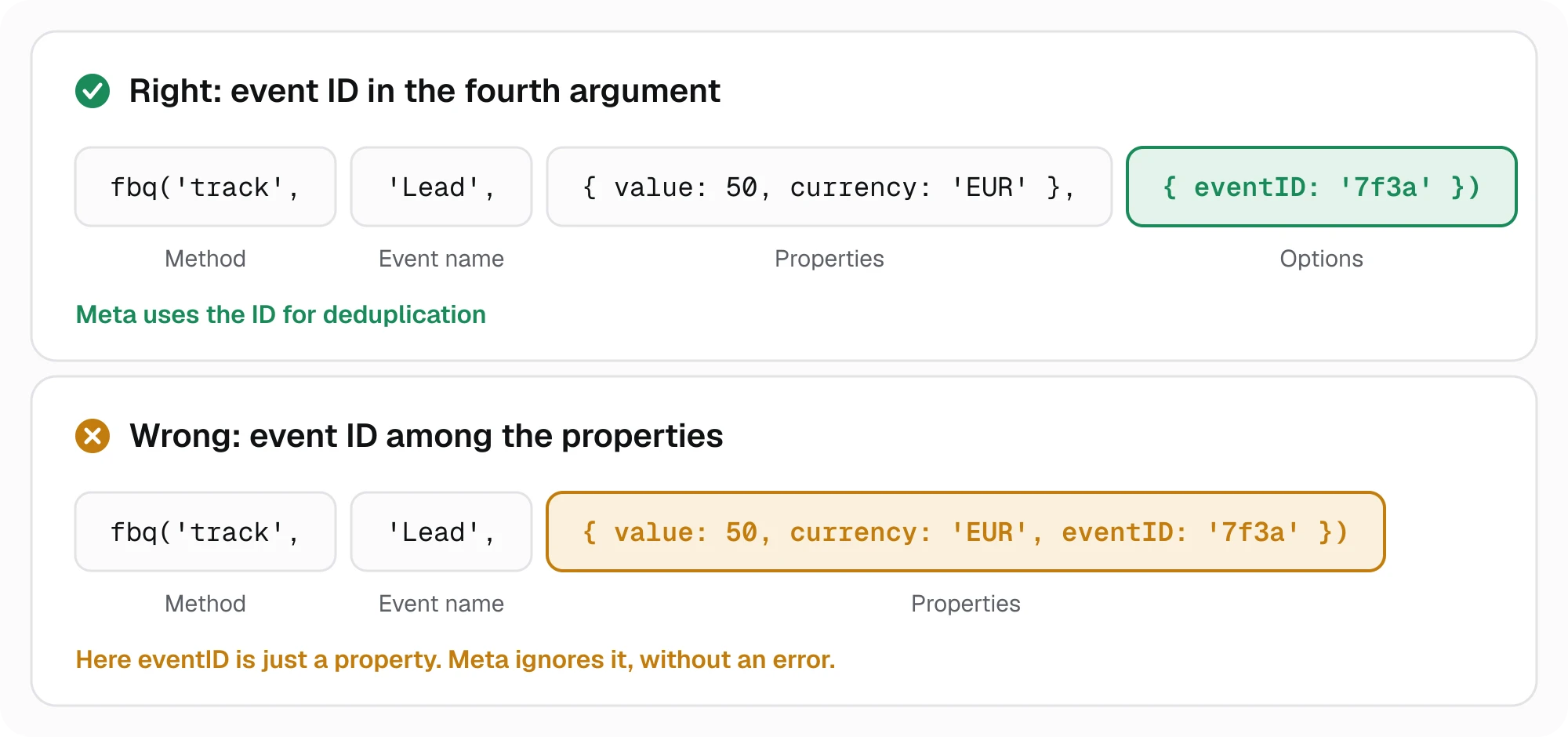
If only the server sends an event_id, Meta has nothing to pair it with. A common pixel mistake: the ID goes into the third argument instead of the fourth, next to value and currency. There it is an ordinary property, and Meta ignores it for deduplication without reporting an error.
3. Event names differ
Meta compares the name as well. Lead in the pixel and lead on the server, or Purchase in the browser and a custom event Order on the server, are different events to Meta, even with the same ID.
4. Several setups send in parallel
A plugin, a tag in Google Tag Manager and a forgotten pixel snippet in the theme all report the same event. At least one of them doesn't know the event ID. On top of that, the pixel's automatically detected events are also sent without an event ID. Search your site's source for fbq( and your GTM container for Meta tags before adding a new path.
5. The browser fires more than once
The thank-you page gets reloaded, the form is submitted twice, or a click trigger fires on every click on "Submit", even when validation fails. Each time a new event with a new ID is created. Meta has nothing to merge, because to Meta these are different leads.
6. One ID for everything
The reverse problem: using the session ID or a fixed string as the event ID makes Meta discard real conversions as duplicates. The second lead in the same session disappears. Here Meta counts too little, not too much.
What deduplication doesn't do
- Prevent repeated firing: Meta only merges the browser and server report of the same event. Two events with two IDs stay two events. Reloads and double clicks have to be caught before that.
- Reconcile numbers across platforms: Meta and Google Ads each deduplicate on their own. Both reporting the same lead comes from their own attribution windows and counting rules, not from missing deduplication.
- Recover lost events: what arrives neither through the pixel nor through the server, Meta can't count. A reliable server path helps against losses, deduplication doesn't.
Show Meta and Google who actually buys.
Leads, meetings and deals go server-side to seven ad platforms, deduplicated with the pixel. So their algorithms optimize for real customers.
How TSO does it: deduplication without your own code
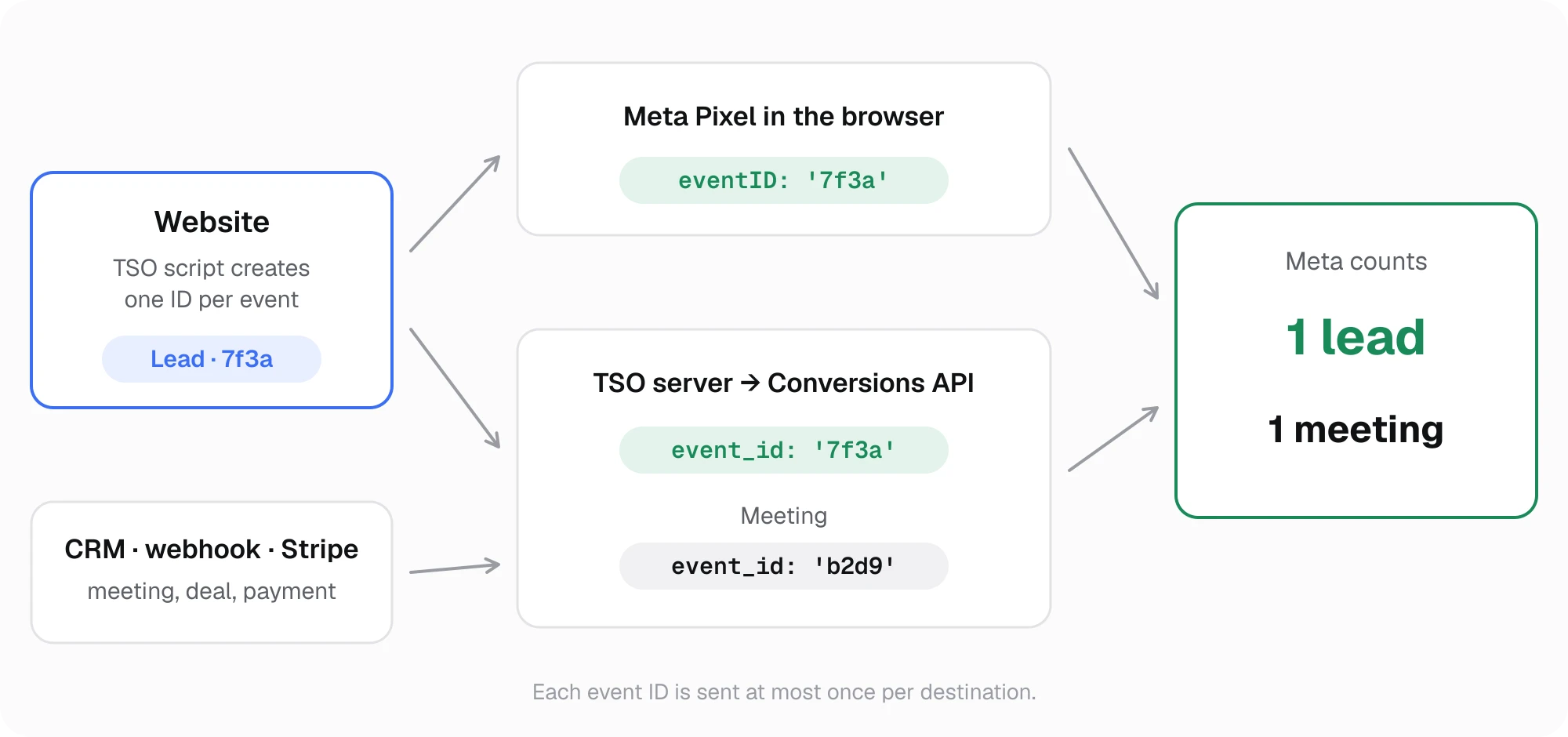
With TSO you don't have to deal with event IDs. The tracking script creates a unique ID for every event and passes it to the Meta Pixel as eventID. TSO sends the same ID as event_id through the Conversions API. Pixel and server take the event name from the same event catalog, so Lead is Lead on both paths.
On top of that, TSO covers the spots where custom setups often break:
- Thank-you pages: in TSO the server decides whether a page view is a conversion. It hands the event back to the pixel with the ID of the server delivery, so the pixel fires once per visit and Meta merges the pair.
- Repeated firing: a reload, a second tab or the same order number don't create a second event. Per event you also set whether it counts every time, once per visitor or once per person.
- Automatic events: TSO switches off the Meta Pixel's automatically detected events, because they carry no event ID.
- Old pixel on the page: if your website already loads its own Meta Pixel, TSO doesn't start a second one and sends through the server only. Remove the old pixel code so its events without an ID don't count twice.
- Later stages from the CRM: meetings, deals and payments have no browser event. They go through the Conversions API with a fixed ID, and each event ID is delivered at most once per destination.
The delivery log shows per destination what went to Meta, with status and reason. For setting up the server side, see the guide Set up a Conversion API.
Conclusion
Double-counted conversions are not Meta's fault, they are almost always a setup issue. The rule is simple: same event name, same event ID, created once and sent on both paths. Check in Events Manager that both paths carry an ID, clean up old pixels and duplicate tags, and catch reloads before they reach Meta. Then CPL and ROAS show again what your campaigns actually deliver.
How TSO helps
Frequently asked questions
Do I need to run Pixel and Conversions API side by side at all?
Meta recommends it. The pixel provides browser signals such as cookies, and the Conversions API reaches Meta even when an ad blocker or the browser stops the pixel. Running both only works with clean deduplication, though.
What if the server event arrives hours later?
According to Meta's developer docs, events with the same event name and event ID are merged if they arrive within 48 hours. If the second one arrives later, it counts as an additional event.
Can I use fbp or external_id instead of the event ID?
Meta describes this as an alternative, but it only works in certain setups. The recommended method is the event ID together with the event name.
Does Meta also deduplicate against Google Ads or my CRM?
No. Meta only merges its own events. Meta and Google both claiming the same lead is solved by your own attribution across all channels.
Terms in this article
In depth in the guide
Daniel is CTO and leads the technology behind tracking, attribution and conversion APIs at TSO.